Jurij Tokarski
SOAPNoteAI V2 Now Serves 100% of Users
Eight months of building V1 and V2 side by side. The bridge mechanics, shipping continuously behind flags, and why stability — not features — gated the final cutover.
SOAPNoteAI V2 now serves 100% of users. The last V1 user gets migrated the next time they log in. V1 is being formally discontinued — the old URLs still resolve for anyone with a bookmark, but it's no longer the active product.
The interesting question isn't how we built V2. It's why we waited.
V2 was ready for new users months ago. New signups have been getting V2 since February, and the full V2 experience since March. We could have force-migrated everyone the day parity was reached. We didn't. The gap between "V2 has every feature V1 has" and "everyone is on V2" was a deliberate choice, and the reasoning behind it is the part I want to write down.
How It Started
Last August, on a Tuesday evening, I got a DM on X from Kunal Modi, the founder of SOAPNoteAI. Twenty minutes later, we had a call booked for the next morning.
By the end of the next day, the paperwork was done, access was set up, and we had a brief: better design and new features. Not a pivot. A rebuild.
One thing was clear from the first conversation: SOAPNoteAI is a HIPAA-regulated product. Every audio chunk and every note line is PHI. That shaped every decision that came after — and I'll come back to it.
First commit landed five days later. Five days from "hello" to code.
The Decision That Shaped Everything
On day one of the engagement we made one call that decided how the next eight months would go: V1 and V2 would coexist until V2 was genuinely ready to take over. No race-to-replace. No big-bang cutover. No "ship the rewrite and pray".
This is how I think rebuilds should work, and it's the principle behind my app modernization package. The pitch is simple: you don't rebuild a working product by turning the old one off and hoping the new one is ready. You build the new one alongside the old one, and you let users cross the bridge when the bridge is finished.
For SOAPNoteAI that meant:
- V1 kept running on its existing domain — a hand-authored static site, three years old, had paid the bills that whole time, and it worked.
- V2 lived on a separate subdomain, on a modern Next.js/React stack.
- Shared authentication across both apps, so signing in on one side meant being signed in on the other.
- A shared backend serving V1 web, V2 web, and the iOS app. Any change had to stay compatible across three clients at once. Not a "nice to have". A hard constraint.
The first real piece of work after the initial commit was wiring up shared auth across V1 and V2. We didn't build a screen first. We built the bridge first.
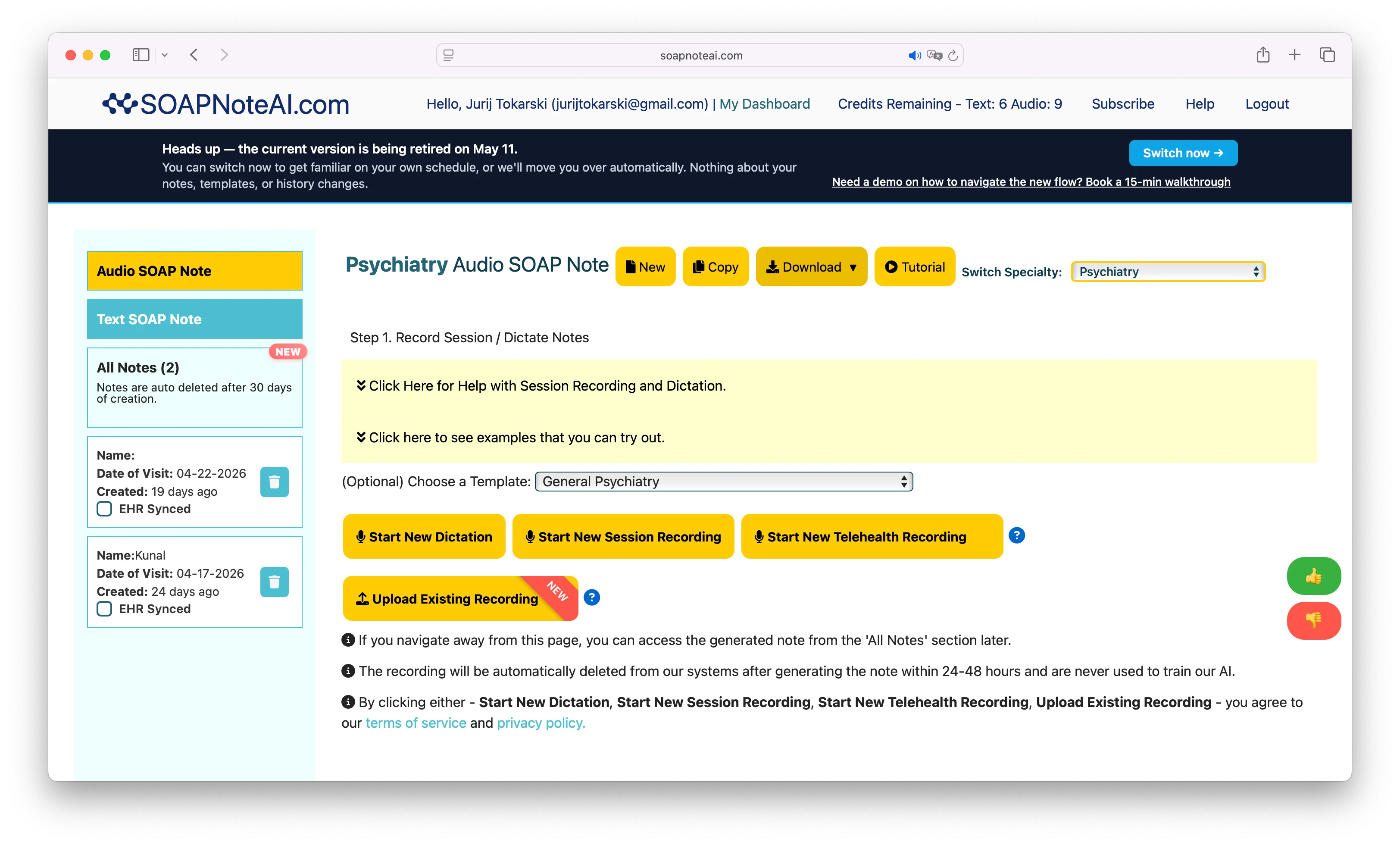 V1 — a hand-authored static site, three years old, working.
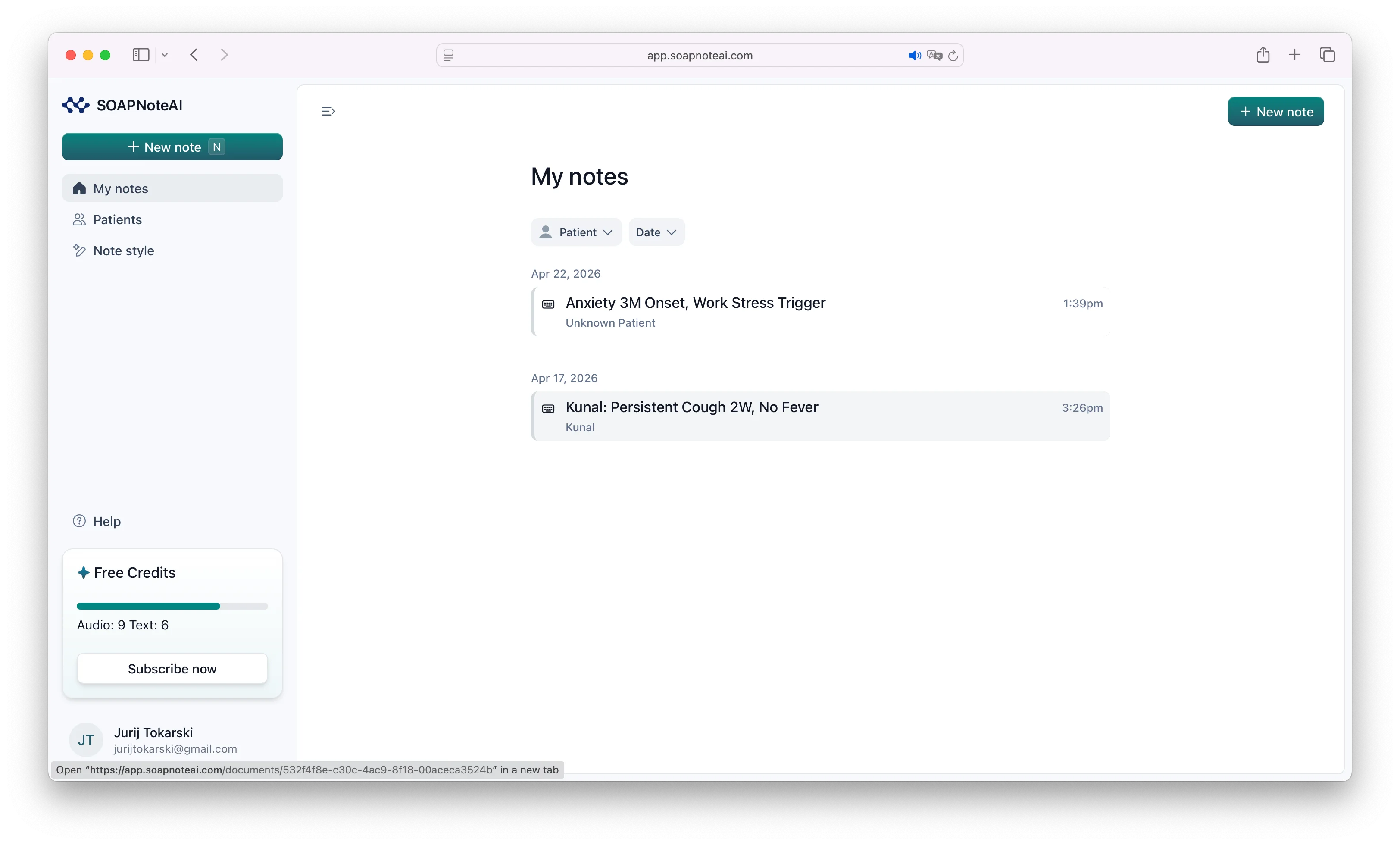 V2 — same product, new platform. Both ran side by side for eight months on a shared backend.
Business Order, Not Developer Order
The developer-optimal way to do a rebuild is to mirror the old routes first — get parity, let V2 stabilise, let V1 fade. That gives you a clean diff and a tidy migration.
Business context dictated otherwise. Kunal had told me a few days in:
"One of the issues with current app is the users sign up but don't take the first action to create a note. It will be one of the first features we will be shipping."
So the first thing we built in V2 wasn't a V1 feature. It was a new onboarding flow that didn't exist in V1 at all. New signups landed in V2 onboarding, completed it, and got bounced back to V1 for the actual product. V2 was a thin onboarding layer over a still-V1 product.
A single shared flag on the user record was the handshake — V1 read the same flag and redirected un-flagged users into V2 to complete onboarding.
That set the order for everything that followed:
- Onboarding — fix the activation pain first.
- Dashboard & notes list — give V2 something to hold users on, but click "view" or "add note" and they still went to V1 via a specialization-to-URL map.
- Edit Note "v1.5" — same features as V1, new UX. A new editing experience users could feel right away — and the foundation Penny needed.
- Penny — our AI assistant for editing notes. The flagship modernization feature. The reason V2 wasn't a reskin. Built on top of the v1.5 edit surface.
- Patient management — turn "patient" from a free-text field on a note into a real entity with proper IDs. Not a blocker, but a small addition that brought a new UX and prepared the ground for what came next.
- New create-note flow — the biggest single piece of work, totally new UX, last to reach parity. Built on top of the patient entity.
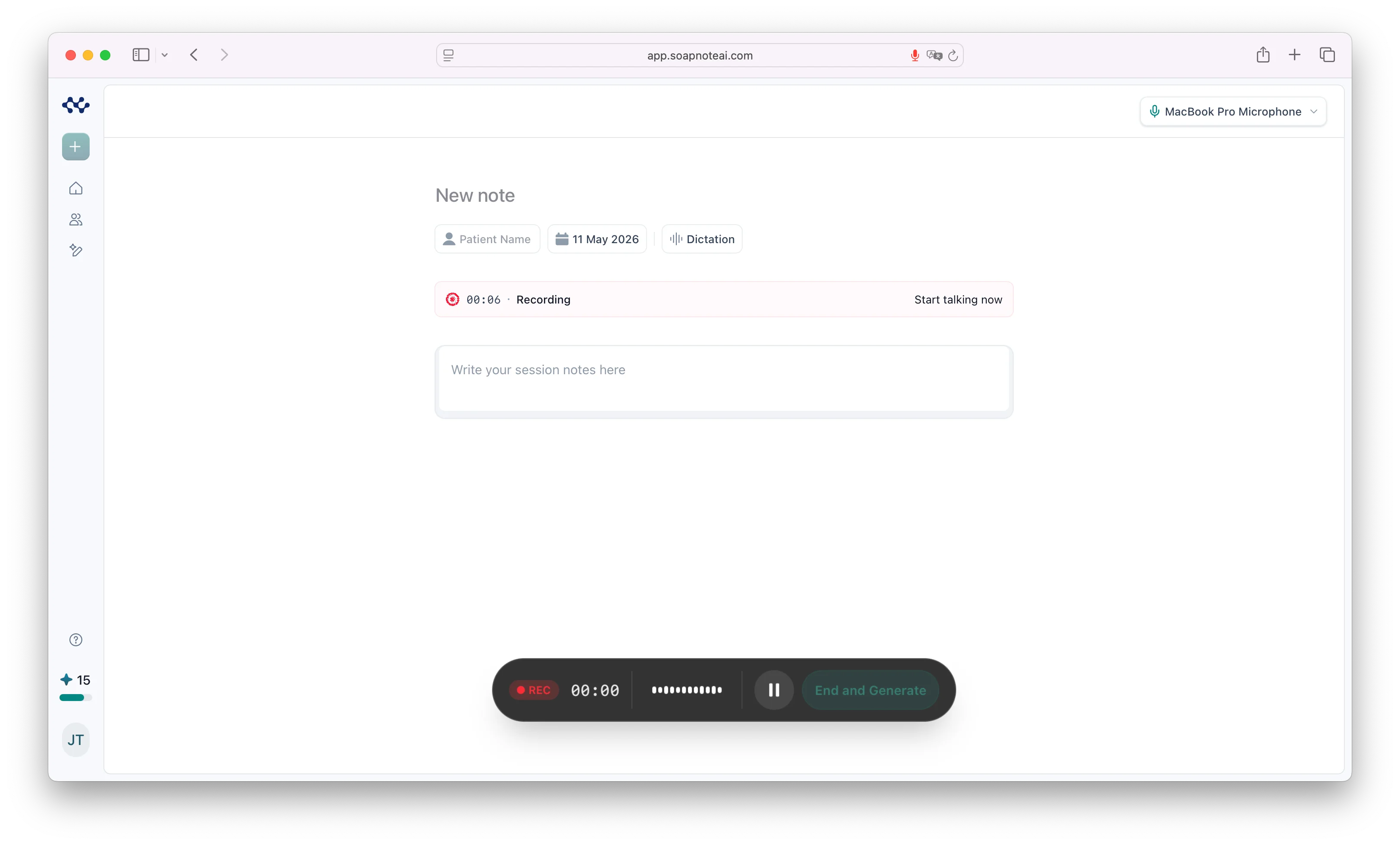 Native dictation in V2 — the last chapter to reach parity, and the most ambitious.
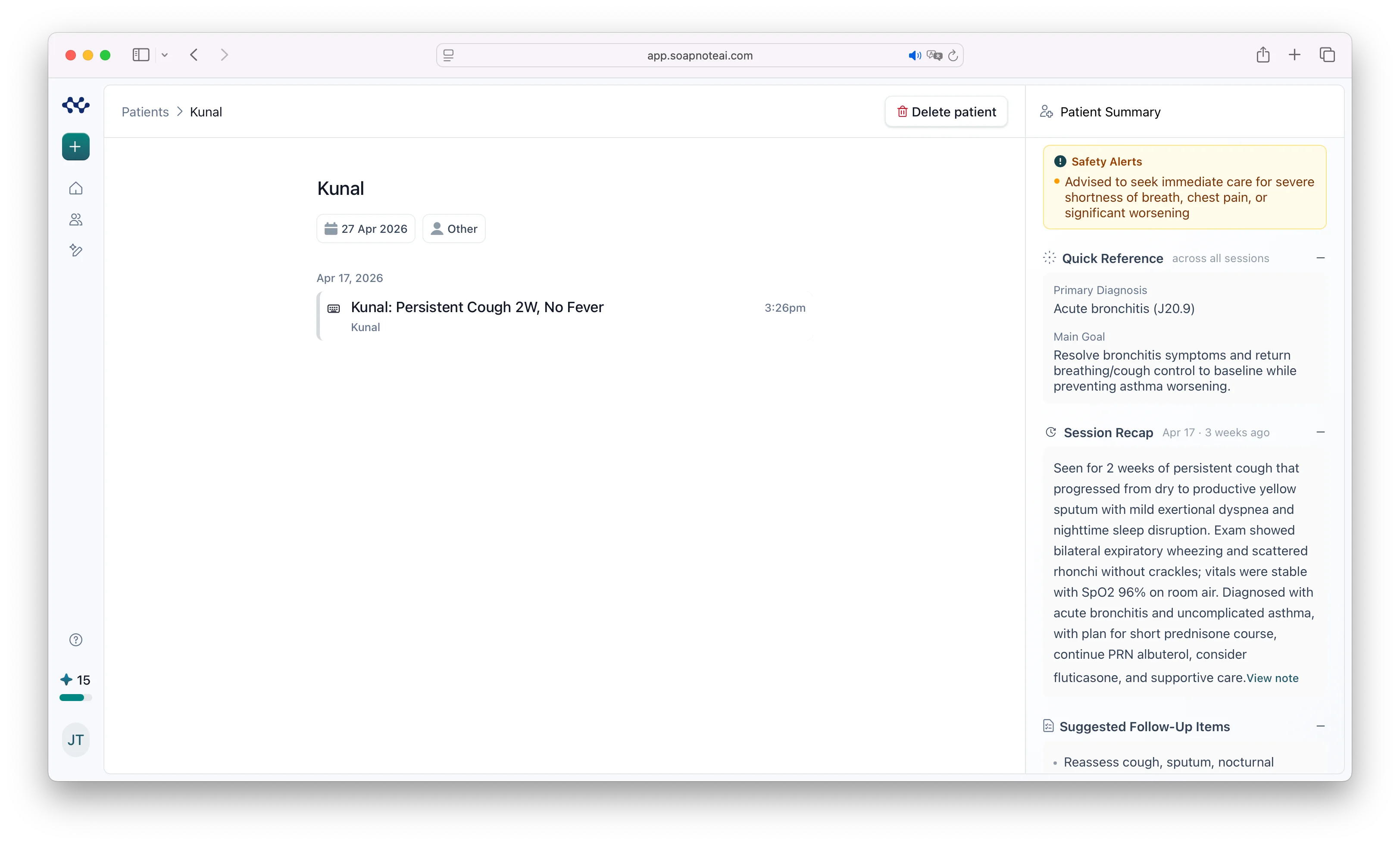 Patients as a real entity, not a string on a note.
Each ordering was priorities, not scope. The founder ranked by user pain; I built top-down.
There's a pattern in this order: every big feature was preceded by a smaller one that doubled as its foundation. Edit Note v1.5 became the diff surface Penny inherited. Patient management became the entity create-note needed. Two birds, one PR — and the bigger swing becomes incremental instead of monolithic.
Create-note came last because it was the biggest swing and we wanted everything else stable before we touched it.
The Bridge Between V1 and V2
The part most people miss when they hear "V2 rebuild" is that V1 had to participate. The bridge isn't a thing V2 builds in isolation — it's bidirectional code that runs in both apps and stays in sync for the life of the migration.
In V2, the bridge boiled down to three pieces:
- A single mapping table that translated each V2 user's context into the matching legacy page. One source of truth for "where does this user go in V1?"
- A safety-valve route that punted to V1 whenever V2 native wasn't ready for that user. Always one click away.
- Shared session handling so the bridge required zero changes to V1 for auth.
V1 had to participate too. It checked the shared flag on the user record and redirected new users into V2 for onboarding. Its product pages added redirects into V2 for the features that had moved there. Closer to cutover, V1 picked up the migration ribbon announcing the retirement date.
Deciding How the Migration Would Work
A few weeks into the project, V2 had a dashboard and a notes list. V1 had neither — V1 sent users directly to specialization pages with no home view. So we added small UI hooks to V1: a "dashboard" button and a "my notes" button, both linking to the corresponding V2 pages. Existing users staying on V1 could now click those buttons and see V2 for those views.
That was the first piece of V2 functionality existing users actually used. It also clarified what coexistence meant in practice: V2 didn't have to replace V1 wholesale — it could ship one piece at a time, with V1 linking out to it.
The bigger question came up later, when Edit Note was ready. Showing existing users a different note editor wasn't a button to add to V1 — it changed the core experience.
We decided it over WhatsApp: split users by signup date. A cutoff timestamp lived in the database. Users registered after that date got the new edit note experience by default. Users registered before it kept the V1 editor.
That gave us a clear migration shape. New users were the V2 cohort from day one. Existing users would move when stability — not feature parity — said they were ready to.
Shipping Continuously Behind Flags
With users split between V1 and V2 by signup date, we still had to keep shipping. That meant continuous flow — deploying to production multiple times a week, including code for features that weren't ready yet, sometimes for features that were barely started.
The mechanism that made this safe was two-layer feature gating.
The first layer was a global flag per feature — on in dev and staging, off in production until the feature was ready. Native recording, for example, lived in production for weeks behind this flag before any user saw it.
The second layer was a per-user flag, off by default. Once the global flag was on in production, this one decided who actually got the new experience. Both had to be on for a user to see a V2 native feature.
That meant the users who were already on V2 — the new signups since February — didn't see incomplete work either. The same flags that let us roll cohorts onto new features also kept everyone else, V2 included, on stable code.
Penny: The Reason V2 Wasn't a Reskin
Around mid-December, Penny went live. Penny is an AI assistant for editing notes — a chat panel that proposes section-level changes to your SOAP note and waits for you to accept or undo each one.
Two pieces of this are worth pulling out, because they speak to why we did the rebuild at all.
First, Penny doesn't overwrite the clinician's note. It proposes line-level changes that the UI renders as a green-add/red-strikethrough diff. You explicitly Accept or Undo. A clinician's note is a legal document; an AI quietly rewriting it would have been disqualifying. The trust model is built into the product surface.
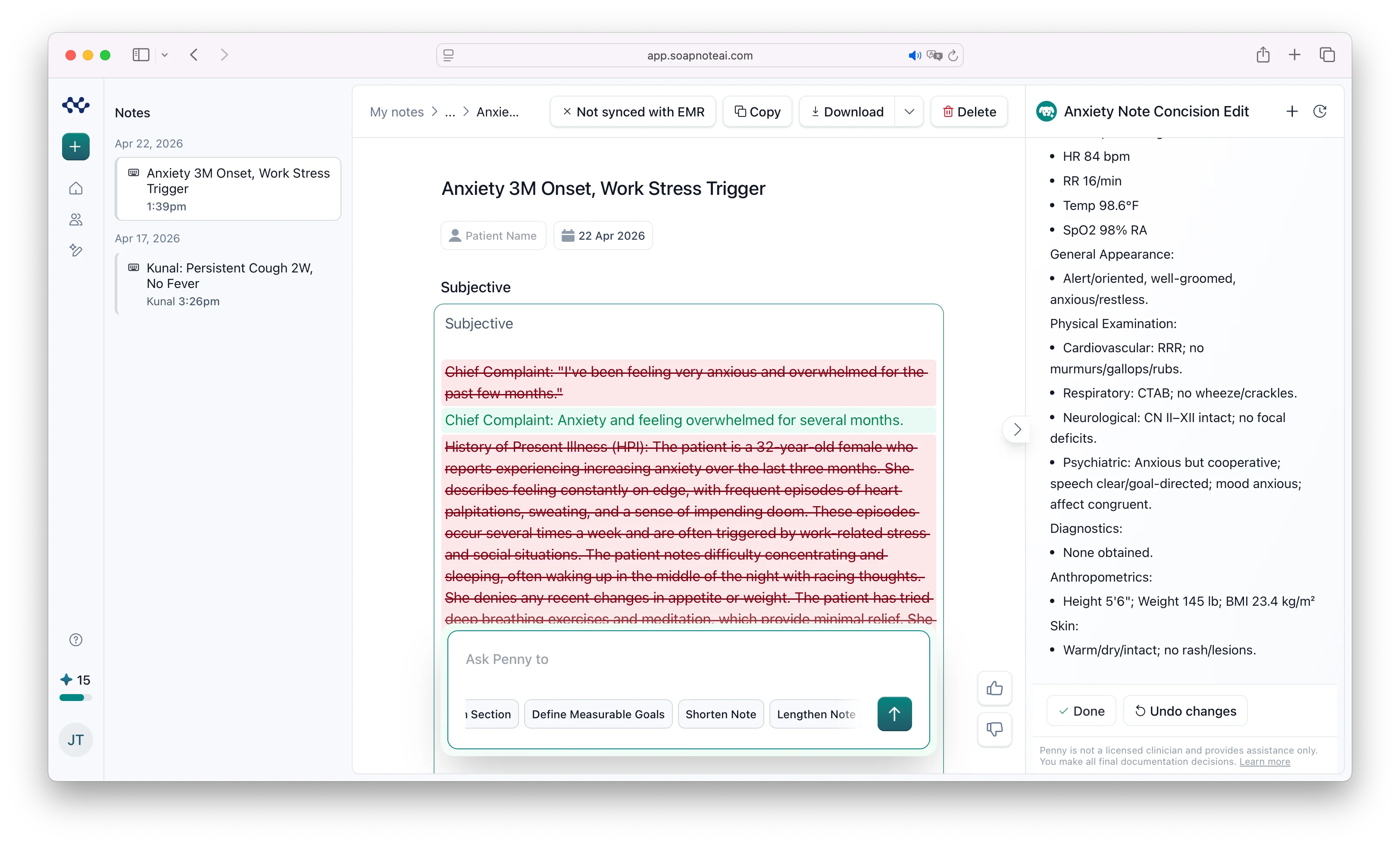 Penny proposes line-level changes. The clinician decides.
Second, Penny is V2-only by construction. V1's static pages can't host a streaming chat panel with long-running connections. This is the cleanest example of why this wasn't a redesign — V2 was the platform that could host the features V1 couldn't ship. The new design was the surface; the new platform was the point.
Every change Penny makes is versioned. Even after the clinician accepts an edit, the previous version is recoverable — undo isn't time-limited to the current session. That matters in a clinical context: a note that looked right last week and looks wrong now can always go back to what it was.
Penny also suggests commands in the chat itself — small contextual prompts proposing the next thing the clinician might want to do with the note. "Expand the assessment." "Add a sleep history question to the HPI." "Tighten the plan." The clinician can ignore them, edit one before sending, or click through. It turns the chat from a blank-prompt experience into a guided one.
Why We Waited
By March, V2 had everything V1 had — plus Penny and structured patient management, which V1 never did. New signups were getting the full V2 experience by default. The job, by the definition most rebuild projects use, was done. It isn't done until it works in production.
We waited two more months. Existing users had three years of V1 muscle memory. Forcing them onto a not-yet-polished V2 would have cost more trust than any feature could buy back. The bar wasn't "V2 has every feature." It was "V2 is better than V1 in ways every user can feel, on every login."
So March and April were hardening. A few examples of the work that doesn't show up in any product changelog:
- Local recovery for in-flight audio — a refresh mid-dictation wouldn't lose a note.
- Error-reporting cleanup — transient blips wouldn't page on-call during the cutover.
- Cohort gating — existing users could move in batches by recency, not all at once.
- PHI hygiene — auditing what got logged across the SOAP-note pipeline. Making sure prompts and transcripts and patient names weren't where they shouldn't be.
In healthcare, the bar isn't works. It's doesn't leak.
Compliance migrations don't have ribbons. They have incident reports. That's what stability gated us against.
What V1 Taught Me About Specs
With V1 still running as a living reference, whenever I wasn't sure how something should behave, I opened V1 and checked. No guesswork, no archaeological reading of old code, no asking the founder to remember.
This is bigger than convenience. Software specs decay faster than software. A doc written eighteen months ago describes the product as it was when the doc was written — not as it is. The code is closer to the truth, but the code only tells you what happens, not what should happen. V1 — the live, working product — answered both at once.
That mattered most for the ambiguous cases. What's the right behaviour when a user has only partially completed onboarding? What happens if you delete a note that's still being processed? V1 had answered every one of those questions in production, with real users, over three years. Whatever V1 did was, by definition, the behaviour customers had come to expect.
For a rebuild, that's the most valuable spec there is. The one that's been pressure-tested by use, not just by intent.
V1 was the spec for "what should this do?" right up until the day it was discontinued.
Why Rebuilds Hide Their Cost
V2 rebuilds are harder than they look, and this is the part most developers underestimate. You're not just building new features. You're building them while keeping backward compatibility — with the old version, with the iOS app, with the shared backend. One mistake doesn't just break V2. It breaks V1 too.
The clearest example: in February, Kunal got excited about streaming transcription and shipped it in V1 first. "Jurij — you may need to sync it" was the message. I ported it to V2. Then V1 kept evolving while I was porting, and I had to re-port pieces I'd missed.
That kind of synchronisation debt is constant in the middle of the work and invisible from the outside. Every PR in V1 is a potential change V2 needs to absorb. Every PR in V2 is a potential change the shared backend has to keep serving V1 alongside. The number of clients (V1 web, V2 web, iOS) multiplies the surface area of "don't break anything."
You can plan for the features. You can't plan for the drift between two living codebases. The only thing that keeps it tractable is to ship small and ship often, so the gap between V1 and V2 never grows large enough to be unrecoverable. The bridge code lives or dies by that discipline.
Where Design Work Is Heading
Ben Lau was on the project before I was — designing the mobile app when Kunal brought me in for V2 web. By the time V2 needed real design attention, Ben moved across and started shaping V2's UI in Figma.
The loop we ran wasn't the usual designer-handoff. Ben deliberately didn't polish Figma to 100%. He stopped around 80% fidelity — enough to communicate the structure, the hierarchy, the intent. The remaining 20% — the spacing, the micro-alignment, the hover states — wasn't where he wanted to spend Figma time.
I took his designs and implemented the screens as close to them as I could, but cutting corners on the polish. Wire up the data, hit the real APIs, get the feature working end-to-end. Don't burn hours nudging a margin that the designer was going to revisit anyway.
Then Ben took over. Pulled the branch, opened it in Cursor or Claude Code, and started polishing the UI — directly in the codebase. The final polish happened by editing real code with AI assistance, not by moving pixels in Figma and re-handing-off.
It felt like the same shift I've noticed in development this year. AI takes more of the mechanical bits on both sides, which leaves more room for the parts that actually need a human — architecture and trade-offs on the dev side, user experience and product thinking on the design side.
What the Cutover Actually Is
The migration itself is the smallest thing in the whole story: one flag flip, and the next time the user logs in, they see V2. No batch job, no notification storm.
The whole technical apparatus — the shared auth, the V1 routing map, the safety-valve route, the feature flags, the bidirectional bridge — existed to make that one toggle safe.
V1 is formally discontinued today — bookmarks still resolve, but the active product is V2. Eight months of work that lived in the seams between two apps quietly becomes invisible.
A working product paid SOAPNoteAI's bills for three years. Today it hands off to its successor without anyone losing a note. That's the whole job.
Live: soapnoteai.com.
Subscribe to the newsletter:
About Jurij Tokarski
I run Varstatt and create software. Usually, I'm deep in work shipping for clients or building for myself. Sometimes, I share bits I don't want to forget.
x.comlinkedin.commedium.comdev.tohashnode.devjurij@varstatt.comRSS